Showing posts with label Linux Mint. Show all posts

Linux Mint 19 provides an above average performance with friendly interface

Last week, Linux Mint team has announced the release of Linux Mint 19. It is a stable release of popular GNU/Linux distribution based on Ubuntu 18.04 LTS. Linux Mint 19 comes with a handful of changes and improvements over previous releases. It provides 3 flavors featuring Cinnamon, MATE & Xfce Desktops.

The Latest issue of DistroWatch weekly (2nd July 2018) features a review of Linux Mint 19. This review observes Linux Mint 19 as an above average distribution, that exhibits a decent memory footprint with a friendly interface. The reviewer also expresses his positive experience with the Linux Mint 19. During one week of experiment time, he could n't find any serious issues with this distribution. On the positive side, the reviewer counts the hardware support, revamped Software Manager with Debian & flatpak support, and decent set of visual effects. Linux Mint 19 also ships a decent set of applications by default. Nothing more and nothing less.


The negative points are, however, very much personal opinion. The reviewer is unhappy with the changes made in update manager. Earlier, update manager used to classify packages based on their stability and priority. Now, update manager provides the complete update option and relies on Timeshift backup tool to maintain the stability of the system. Timeshift tool fails to works on an encrypted home directory and with the brtfs file system.
Mint 19 is based on Ubuntu 18.04 LTS and will receive approximately five years of security updates. The new version also features a number of changes and improvements. For instance, Mint now includes a welcome window that runs when the user logs in and guides the user through steps that should be performed immediately after the operating system has been installed. The Mint update manager now installs all software updates by default. Previously the update manager could be used to filter out risky software upgrades, but that has been phased out in favor of operating system snapshots. Speaking of snapshots, Timeshift, a snapshot manager is included by default and I will talk about it later. The project's documentation also points out that MATE now includes HiDPI monitor support. 
You can read the original Linux Mint 19 review in distrowatch weekly. 
Linux Mint 19 Cinnamon, Xfce & MATE editions released

The Linux Mint team has announced the immediate availability of Linux Mint 19 Tara. This release includes Cinnamon, MATE and Xfce editions of the project. All these releases are built on top of Ubuntu 18.04 but feature different desktop environments as the name suggests.

Linux Mint 19, is a release distribution based on Ubuntu 18.04 LTS, will be supported till 2023. In the meantime, users can enjoy serious package updates and security fixes for this release.
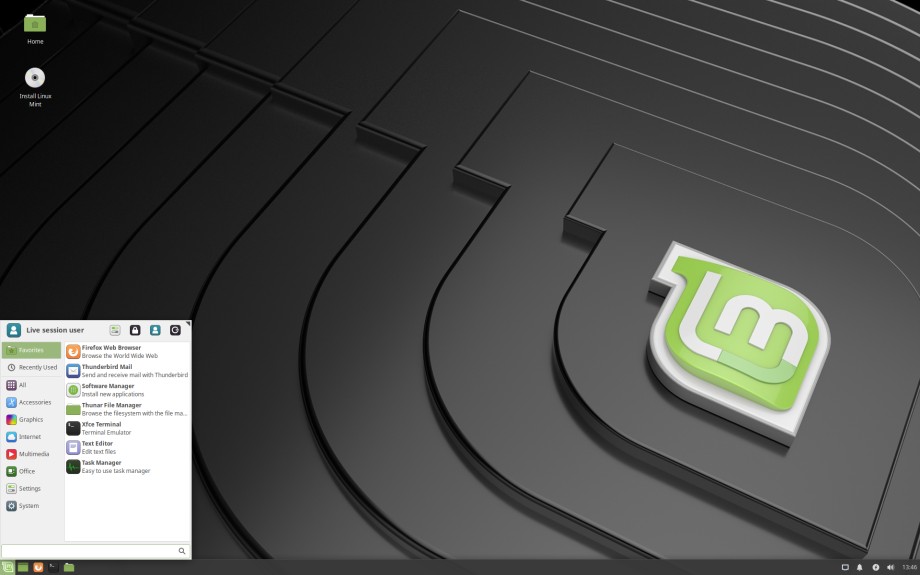
A preview of Linux Mint 19 Xfce Edition
The main highlights in Linux Mint 19 Cinnamon include:
  • Timeshift - A backup tool to backup your files and configurations. Although this tool was introduced in Linux Mint 18.3 and backported into other releases, it acts as a strategy center in Linux Mint 19 updates.
  • The Update Manager won't categorize updates based on their stability & reliability. Instead, the system will completely rely on timeshift to maintain the stability of the system.
  • Linux Mint 19 brings a brand new welcome screen for introducing operating system to the users.
  • Linux Mint 19 comes with a much-improved Software Manager, which also includes integrated support for flatpak applications.
  • Cinnamon Desktop 3.8, MATE 1.20, Xfce 4.12
For more details on Linux Mint 19 flavors, read separate release announcement of each Linux Mint flavor.
Linux Mint 19 Xfce release announcement
Linux Mint 19 MATE release announcement
Linux Mint 19 Cinnamon release announcement

Linux Mint 19 Xfce, MATE & Cinnamon beta releases are available now

The Linux Mint team has released Linux Mint 19 Tara, latest development release of upcoming Linux Mint 19 stable release. This beta release includes Xfce, MATE & Cinnamon releases.

A preview of Linux Mint 19 Cinnamon beta edition
The main highlights in Linux Mint 19 includes Timeshift a tool to backup and restore your system, improved update manager which suggests to install all available updates instead of holding may break updates and relies on timeshfit to restore the stable system in case of any issues. This release also includes a brand new Welcome Screen, redesigned Software Center with Flatpak support, Cinnamon 3.8 and more.
In Linux Mint 19, the star of the show is Timeshift. Although it was introduced in Linux Mint 18.3 and backported to all Linux Mint releases, it is now at the center of Linux Mint's update strategy and communication.

Thanks to Timeshift you can go back in time and restore your computer to the last functional system snapshot. If anything breaks, you can go back to the previous snapshot and it's as if the problem never happened.

This greatly simplifies the maintenance of your computer, since you no longer need to worry about potential regressions. In the eventuality of a critical regression, you can restore a snapshot (thus canceling the effects of the regression) and you still have the ability to apply updates selectively (as you did in previous releases).

Security and stability are of paramount importance. By applying all updates you keep your computer secure and with automated snapshots in place its stability is guaranteed.

The Update Manager no longer promotes vigilance and selective updates. It relies on Timeshift to guarantee the stability of your system and suggests to apply all available updates.

Updates are sorted by type, with security and kernel updates at the top.

A new type was introduced for updates originating from 3rd party repositories and/or PPAs. Hovering your mouse cursor over these updates shows their origin in a tooltip.

In the past automatic updates were reserved to advanced users. It was assumed that if somebody was experienced enough to set a cron job, they would be experienced enough to parse APT logs and work around regressions. Thanks to Timeshift, which makes it easy for anyone to work around regressions by restoring snapshots, automatic updates can now be enabled easily, in the preferences.
For more information on each releases, see separate release announcement and release notes for each flavor in Linux Mint blog. You can also read more on Linux Mint in our gallery page.

Linux Mint 19 BETA is scheduled to release on 4th June, final release will arrive on June end

In latest news letter (May 2018), Linux Mint team has shared plan for upcoming Linux Mint 19 release. The Linux Mint 19 BETA is scheduled to release on 4th June and after the beta testing, the final release will be shipped by the end of June.
All 3 editions of Linux Mint 19 (Cinnamon, MATE, Xfce) are currently in QA. The various bugs which were found were fixed and we’re expecting them to pass QA tomorrow. We’re planning the BETA release for Monday the 4th.

We hope you’ll enjoy testing these BETAs and we look forward to receiving your feedback.

The BETA phase for Mint 19 will be longer than usual, with a stable release planned for the end of June. A lot of code was ported to python3, gksu was removed and replaced with pkexec, MATE now supports HiDPI automatically, we’re using a brand new package base, the theme engine in GTK 3.22 is very different than in GTK 3.18 and might cause a few issues in Mint-X, and we’ve switched to Mint-Y and its new set of icons so we’re expecting many little bugs and paper cuts.
You can read the official news letter in Linux Mint blog. You can also read about Linux Mint in our gallery.

Linux Mint 18.3 will feature window level progress info and redesigned backup tool

In monthly news letter for August 2017, Linux Mint team has unveiled some planned highlights of upcoming Linux Mint 18.3 stable release. It includes a completely rewritten system backup tool and window level progress to show progress on task bar.

The backup tool has been completely rewritten to provide a better experience. The code has been minimized and modernized to ensure better performance and stability. Now, it has better multi-threading support, and compression mechanism. It does not require users to enter password as backup is no more performed as root user. The backup tool is revamped in such was that, it will backup your home directory into archives. Optionally, you may configure it to ignore some of the file types. It also provide option to remembers apps present in your current installation.

A preview of backup tool in upcoming Linux Mint 18.3
Linux Mint 18.3 will also show progress of current transaction on task bar. For example, if you are copying some file, it's progress will be shown on task bar also, so that you can keep an eye on it while running other applications. This idea is adopted from Windows 7 and is implemented using LibXApp, a C library available in most distributions.

We decided to limit its scope.  We wanted this tool to do less and to do it better. You won’t need to enter your password to run the Backup Tool, because it no longer runs as root. When backing up data you no longer need to go through options or to select a source and a type of backup. This tool is now dedicated to making a backup of your home directory, nothing less and nothing more. It saves all your files into a tar archive. When restoring a backup, files are restored in the exact same place they were before, with their original permissions and timestamps.

Of course when performing a backup you have the option to exclude files and directories and the items you exclude are remembered for future backups (the idea is to make it easy for you to perform new backups regularly).
....
When an application is busy doing something it usually shows you a progress bar. Instead of mindlessly looking at the bar and waiting for it to reach 100% people usually seize the opportunity to do something else or distract themselves on the Web while waiting. The problem is.. how do you know when the application is ready if you can’t see its progress bar? How can you keep an eye on the progress of the operation after you minimize the window or focus other windows on top of it?
To know more about Linux Mint project activities, see project's monthly news letter for August 2017.

Linux Mint 18.2 stands out as best desktop Linux

It is not a secret that, Linux Mint is highest ranked GNU/Linux distribution in distrowatch. It attracts beginners and advanced users with it's smooth and traditional desktop experience. It can be easily used by anyone, even one without any knowledge of Linux boxes.


The zdnet portal has published a review on recently released Linux Mint 18.2 stable release. It remarks that, even after years, Linux Mint is continuing as best desktop based GNU/Linux distribution. With Cinnamon 3.4.3, it presents a very crisp and pleasant desktop with improved performance. Also, other features under the hood updates, improved update manager, cinnamon spices ..etc makes it to stand out of the crowd.
Once more, Mint's Cinnamon interface with its classic windows, icons, menus, pointers (WIMP) interface is simple and easy to use even if you've never touched Linux in your life. Cinnamon 3.4.3's look and feel has a crisp, clean appearance with easy to read fonts and colors that you can easily adjust to your heart's content.

While the new Cinnamon interface looks and works the same, under the hood it has many speed improvements. These include splitting the settings daemon and the Nemo file manager into multiple processes. In addition, the Cinnamon JavaScript Interpreter (CJS) has been re-based on a newer version of GJS, Gnome's JavaScript binding, for improved performance and memory usage. The result is a faster, more stable, and easier to debug desktop.
You may continue reading original review in zdnet portal.

Linux Mint modernizes Software Manager for better user experience

In monthly new letter for July 2017, Linux Mint team has revealed that, they are working on modernizations of Mint Software Manager, a package management tool developed by Linux Mint project itself. This process of modernization is inspired by other GUI based package management tools available in Linux World.

A preview of update mint install. (Courtesy : Linux Mint)
Linux Mint was one among the first GNU/Linux distributions who introduced the concept of modern Software Management tool. This idea was evolved from Android Play and iOS Appstore. The mint install presented a simple and efficient way for managing software installations. It was a great help for beginners who were not familiar with the concept for command line. This software manager remained almost unchanged for years. Now, when Linux Mint team looks into it, it feels pretty outdated. That is why the team is working on modernization of Software Manager.

Following are key points on which Linux Mint team focusing while modernizing Software Manager.
  • The user interface looks more modern and its layout is inspired by Gnome Software. Its simpler, more consistent than before and it makes the application look much cleaner.
  • The software manager no longer uses Webkit. The only toolkit used is GTK and the entire application was ported to GTK3, to bring support for HiDPI.
  • The software manager launches 3 times faster than before. Browsing categories and apps is almost immediate.
  • The backend was ported to AptDaemon and the Software Manager now runs in user mode. Consequently you do not need to enter any passwords to browse applications, and if you enter a password to install or remove an app, the authentication is remembered for a little while so you can install or remove other apps without having to enter that password again.
For the original announcement and other monthly updates from Linux Mint, you may proceed to projects official blog.

Linux Mint 18.2 Sonya released in Cinnamon, MATE, KDE & Xfce flavors

The Linux Mint team has announced release of Linux Mint 18.2 Sonya. In addition to official MATE and Cinnamon flavors, KDE and Xfce flavors are also available for download. This is first time in history, Linux Mint team shipping all 4 flavors together.

Linux Mint 18.2 KDE Edition
Just like recent releases of Linux Mint, Linux Mint 18.2 is also based on Ubuntu 16.04.x LTS and will continue to provide support till 2021. This release is an incremental release in 18.x series and contains updated packages, user experience improvements and various bug fixes.

Some of the notable highlights in Linux Mint 18.2 Sonya can be listed as follows:
  • Cinnamon Desktop 3.4 which features better organization and management of desktop icons
  • Collection of Cinnamon applets, themes, desklets and other extensions which are commonly referred as Cinnamon spices.
  • Improved bluetooth support
  • A lot of refinements has been applied to Xed - text editor
  • The media player, Xplayer, also received improvements to its user interface.
  • It's now much easier to navigate in Pix. Keyboard and mouse shortcuts were reviewed and largely improved. They are more intuitive and more consistent with other applications such as Xviewer.
  • The Xreader PDF and document viewer received many bug fixes and improvements.
  • Just like Xreader and Pix, Xviewer's toolbar was also redesigned and it received support for dark themes.
  • The Update Manager received many improvements.
  • Linux Mint 18.2 features a brand new login screen. It uses the LightDM display manager by default along with the "Slick" greeter and the "LightDM Settings" configuration tool.
  • Brasero is still available in the repositories, but no longer installed by default.
For more information, see separate release announcement for Cinnamon, MATE, Xfce & KDE flavors.

Mint 13 reached EOL, LMDE gets MATE 1.18; Read Linux Mint april updates

The Linux Mint 13 Maya, a long term supported release based on Ubuntu 12.04 is about to reach it's end of life. Current users of Mint 13 will have to upgrade their system to enjoy further support and updates. - Says monthly news letter of Linux Mint project.

Courtesy : Linux Mint blog
Linux Mint team has published their monthly news letter summarizing contributions and other project related updates in April 2017. Following are major highlights listed in this news letter.
  • Linux Mint 13, the first release of Linux Mint project to adopt Cinnamon and MATE Desktops instead of discontinued GNOME 2.x, project has completed it's five years of support period and has reached end of life. The steps required to follow for upgrading from Mint 13 is explained in a forum post.
  • Linux Mint 18.2 will be coming with code name Sonya, wife's name of Michael Webster, a development team member of Linux Mint. She was expired recently. Mint project is joining in the loss of Michael by giving the code name Sonya.
  • Linux Mint Debian Edition (a semi rolling distribution based on Debian) will get MATE 1.18 in a few days. It more likely to ship MATE 1.18 in this week only.
  • Cinnamon 3.4, upcoming version of Cinnamon desktop will include numerous changes which includes feature enhancements and performance improvements.
  • Cinnamon spices website has been updated to enable authentication via google, github and facebook. Authenticated users can like and write comments for their favorites spices (plugins).
  • Linux Mint 18.2 will be using LightDM as default window manager.
For further details on these updates, see weekly news letter published in Linux Mint blog.

Linux Mint KDE flavor is beautiful and easy to use : Review

Linux Mint project a well known Ubuntu based, non-canonical project that attracts people because of it's modern yet familiar desktop design metaphor. The project officially ships MATE and Cinnamon flavors. In addition to that, there are community contributors associated with Linux Mint which delivers this distribution in Xfce & KDE flavors.


The Linux and Ubuntu portal has published a review by exploring Linux Mint KDE flavor. This review observes, Linux Mint KDE flavor is simply beautiful and it is relatively easy to use. This review goes through different aspects of operating system including Applications used, desktop organization, security updates and bug fixes, easy of use and installation ..etc.
Unlike Windows, You have everything ready in mint. As you can see below, this is called welcome screen. It has 8 icons. The first one shows you the new features.
The second is Documentation which you should read over once if you are new to computer or Linux world.

​Then we have app which is like play store in android. It is a package management software or at least its front-end. We can install apps from it easily.
 
If any of your hardware needs proprietary drivers, then you should use them. It will increase performance. But mostly you won't need it unless your hardware is too recent. 
For complete review, checkout original post in Linux and Ubuntu portal.