Showing posts with label ReactOS. Show all posts

ReactOS 0.4.8 released with improved user experience, stability & NT6+ support

The ReactOS project has announced the release of ReactOS 0.4.8, latest tri-monthly release of windows binary compatible, open source operating system. This release brings various user experience improvements, kernel stability fixes, and better NT6+ software support, especially for games.


The power of open source

Beginning from 0.4.7 release, ReactOS team has migrated most of the development activities to Github. This has significantly helped the project to get contributions from the enthusiastic community out there. Within this short span, ReactOS project was forked 248 times. The project has received 209 pull requests and 1094 commits in this period, which is summed up in ReactOS 0.4.8.

Refining the user experience

One of the prime concern of ReactOS is improving the user experience. Towards this goal, ReactOS 0.4.8 brings some crucial improvements on Taskbar configurations to fix *always on top*, auto-hide, and toggle lock features. Also, now balloon notifications are behaving properly and support notification queue. The notifications from killed or terminated applications will be automatically removed from the queue.

Multiple icon selections on the desktop were impossible prior to 0.4.8 release. Now, it has been fixed and also the renaming and deletion of files and folders work reliably.

Other user experience related improvements includes shell autocompletion support, ability to unmount network drives directly from explorer, and the eject and disconnect item is implemented on the context menu.

"From the visual point of view, several glitches related to the redrawing of static text elements, scrollbars, button captions, fonts and text background colors were fixed in this version. As a bonus, now ReactOS also detects more themes and is much faster when rendering big amounts of text" - mentions the release announcement.

Improved NT6+ Software support

As a part of leaving NT5 behind, ReactOS is expanding its target to NT6+ platforms which include Vista, Windows 7, 8 and 10. The required logic for this is getting implemented in NTDLL and LDR. Kernel32 is now capable to support NT6+ applications and the shim compatibility layer is also getting improved. Although these changes are in the experimental state, ReactOS 0.4.8 can provide support for recent applications with NT6+ dependency.

For more information on ReactOS 0.4.8, read release announcement published on project's website.

ReactOS 0.4.6 released with huge improvement in hardware support and better stability

The ReactOS release engineering team has announced release of ReactOS 0.4.6, latest iterative release of independently developed windows binary compatible operating system. This release brings huge improvement in hardware support and fixes several issues to provide a more mature systems.

ReactOS is getting more mature for real hardware resources. ReactOS 0.4.6 fixes various issues associated with dual booting and it uses a corruption free mechanism for handling partitions in hard disk. It can also load custom kernels and HAL( Hardware Abstraction Layer).


msstyle theme in ReactOS 0.4.6 (Courtesy : original release announcement)
Another visible highlight of ReactOS 0.4.6 release is improvement in msstyle appearance. The msstyle theme was introduced with 0.4.5 release, to attract people who prefer a modern look and feel. However, it was not performing well due to various in Shell32, Comctrl32 and Browseui. All theses issues has been fixed in 0.4.6 release so that, msstyle theme is functioning completely. There are other user experience improvements like lock task bar, hide inactive icons, group similar icons ..etc. All these changes will be persisted on reboot.
0.4.6 is much more stable now as a result of several memory manager, ntoskrnl and filesystem fixes. To name a few, mapping a view of the physical memory sections works now, several MM and NTOS leakages were plumbed, and NTOS:IO critical bugs were fixed. Several buffer overflows and overruns, logic issues and dead code detected by Coverity and other tools have been fixed, leading to less corruptions and leaks.

In order to track ReactOS compatibility with Windows behavior, 1,088,893 unit test cases have been added since 0.4.5. This new release has been tested through 14,238,159 unit test cases, failing just 18,419 (a 0,129% ratio failure). Still, ReactOS is marked as Alpha for the moment.
For more detailed information on ReactOS 0.4.6 release, see original release announcement published on projects website.

ReactOS 0.4.4 released with basic printer support

Continuing its journey to be an ideal operating system, the ReactOS project has announced release of ReactOS 0.4.4, fifth release in 3 month evolutionary release cycle started by the project since release of v 0.4.0.

During the past release cycle, significant amount of effort was spent on improving overall stability and usability of operating system so that it will appear more appealing to the end users. Most of these improvements were showcased on FOSDEM convention held at Brussels on 4th and 5th of February.

Another notable highlight of this release is basic support for printers. Currently this supported is very primitive and can only work with parallel port printers. However, it is a good step moving ahead to support all types of printers.


Also, comparing to 0.3.x series there is a lot improvement in applications rendering. The weird misalignment issue with tool bars and icons in applications has been addressed by 0.4.x series. There are still some issues in rendering. However, there overall user experience is improved dramatically.
Today marks the fifth release of the ReactOS 0.4.x series, as well as the fifth following the 3 month release cycle started by 0.4.0 itself. Progress has continued steadily, with a great deal of work going on in the background to improve ReactOS' general usability and stability. Many of these improvements were on display at the FOSDEM convention in Brussels that took place on the 4th and 5th of this month. Certainly one of the more notable albeit less visible additions was the incorporation of basic printing support by Colin Finck. At present ReactOS is only capable of sending print commands to a parallel port printer, but this is the first step towards universal support and Colin should be applauded for his effort.
 You can also read original release announcement in ReactOS blog.

ReactOS 0.4.3 released, another incremental update

The ReactOS project has announced release of ReactOS 0.4.3, fourth incremental update of independently developed, windows binary compatible, open source operating system inspired by windows 9.x architecture. This release proves that, the projects plan to release incremental updates is on track and going as expected.

With this release, ReactOS has fixed almost 342 issues including text alignment issue which was due since 2006. Another notable highlight of this release is switching to a new winsock library which was undergoing development for several years. This will enable effective support for all network operations in user mode applications and improve ReactOS compatibility with applications like GoG(Good Old Games) client and newer versions of python runtime.

Notable in this release is the switching to a new winsock library that had been started several years ago by Alex Ionescu and imported into trunk by Ged Murphy. Even after it was brought in however significant work remained to be done before it could replace the old winsock library, work which Peter Hater and Andreas Maier undertook. Their effort has now reached a point wherein the team feels it is ready to supplant the original library and 0.4.3 serves as the first release to incorporate it. As the winsock library underpins effectively all network operations in user mode applications, and its improvement should be a significant boon for ReactOS' compatibility with such programs as the Good old Games (GoG) client and newer versions of the Python runtime.

Behind the scenes the team has made a major effort to flesh out the test suite, ranging from memory related functionality to the windows shell API. Work also continues on the aptly named Another Rewrite of the Memory Manager Module (ARM3) with the initial implementation of sections support, the last major piece of functionality before it can completely replace the old memory manager.
You can find more highlights, previews and screenshots of this release in a release announcement published by ReactOS project.

ReactOS 0.4.1 relaesed, A refined version of ReactOS 0.4.0

The ReactOS project has announced release of ReactOS 0.4.1, latest development release of windows binary compatible, open source operating system, inspired by Windows 9x architecture.

ReactOS 0.4.1 comes just 3 months after release of version 0.4 and this is probably shortest duration between two releases so far. It is expected that ReactOS is switching to faster release cycle and ReactOS 0.4.1 one would be first release in this iteration.


ReactOS 0.4.1 is a refined version of ReactOS 0.4 and it does not bring much of new features, however, following are notable highlights of this release.
  • Activation Context - A fix that came in just a tad too late for 0.4.0, this resolved a problem in the loader that prevented applications depending on various versions of the MSVCRT library from working properly.
  • BTRFS support - Initial read and write support introduced via importing of the WinBtrfs driver.
  • Shell - General usability improvements such as properly rendering icons and improved folder views.
  • USB - A variety of fixes that should make plugging in USB devices slightly less crashy.
  • Virtual machine shared folders - ReactOS now properly supports the shared folders of virtual machines like VirtualBox and VMware Player via network places.
For more information, see original release announcement published by ReactOS team.

ReactOS 0.4 Screenshot Tour

The ReactOS project is an effort to recreate windows 9x experience. Behind windows 9x experience, it targets to offer support for all modern windows applications. ReactOS is not a GNU/Linux distribution running WINE to support windows applications. Instead it is an operating system developed from scratch and it is inspired by windows 9x architecture.

Recently, ReactOS team announced release of ReactOS 0.4, a new milestone in history of this project. Though it has evolved a lot from it's initial versions, it has a long way to go. It is not yet usable in a production environment.

In this article, I would like to have a tour through different screens of ReactOS. This tour is taken using a ReactOS boot image on VirtualBox. ReactOS  boot image can be downloaded from official website. It is just 90 MB in size.

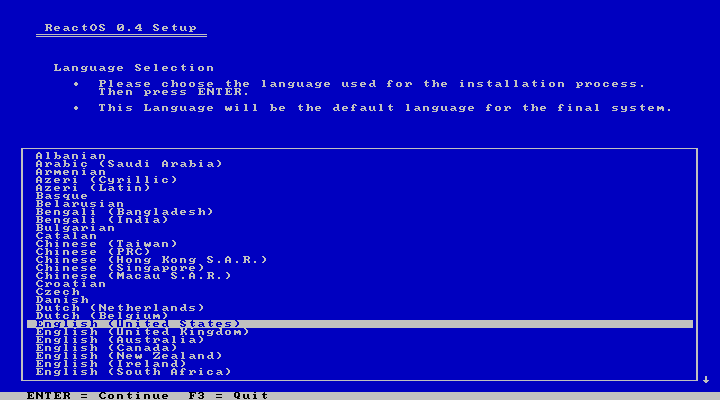
ReactOS installer language selection
ReactOS installer is some white text in blue background. This is pretty much similar to windows 9x installers. Even windows XP was having same installer. At the very beginning, ReactOS installer asks to choose preferred language.

ReactOS installer welcome message
Then ReactOS simply shows a welcome message and tell about license agreements.

ReactOS installer gives warning
In next phase, installer warns that it is in very early stage of development and does not support file system checks and all.

ReactOS detects input devices
Then ReactOS confirms auto detected hardware configuration. It also offers options to change default configurations.

Partitioning in ReactOS installer
Next phase is disk partitioning. Here we can format the partitions and choose partition in which we want to install ReactOS.

ReactOS installation in progress
ReactOS shows installation progress. While installing base system it shows information like kernel pool, kernel cache and free memory available.

ReactOS confirms boot loader installation
Once the base installation is over, ReactOS asks location to installer boot loader. We may either install boot loader in hard disk, or in floppy disk(which is out of context in these days) or we may prefer not to install boot loader if we know what we are doing.

ReactOS boot screen
After installation of base system and boot loader, system will be restarted. ReactOS has got a simple, yet decent looking boot screen.

ReactOS graphical setup wizard
The installation process continues in second phase. In this phase we'll be asked to provide user credentials, keyboard layout, time settings .e.t.c

Installation complete message
When installation is done, ReactOS will ask to reboot system and remove installation media.

Completely loaded ReactOS Desktop
ReactOS desktop is exactly similar to windows 9x desktops. Only difference is minor change in icons. It has classical task bar, icons on desktop ..etc

Automatic Driver installation
When we boot into the system for the first time, ReactOS offers to install device drivers automatically. Unfortunately this did n't work for me. It showed failed message.

Start menu in ReactOS
ReactOS start menu is very close windows 9x start menu. It also ships some small programs like paint, notepad, wordpad, calculator ..etc

Command Prompt in ReactOS
Similar to windows command prompt, ReactOS has also got a command prompt which support almost all commands supported by former.

ReactOS File manager
ReactOS file manager is not something comparable with windows 9x file mangers. It is looking very primitive comparing to windows 9x file managers.

ReactOS Control panel
ReactOS control panel brings different configurations options together. Again it is an idea from windows.

ReactOS application Manager
ReactOS is shipped with a very few number of applications. Other than basic applications like paint, notepad, wordpad, and some configuration utilities it has no applications. However, ReactOS includes application manager which facilitate installation of a wide range of applications.


Installing Mozilla Firefox
When we select an application from list, corresponding installer will be downloaded from internet and then application manager launches installer.

Mozilla Firefox running on ReactOS
ReactOS applications manager comes with several versions of Mozilla Firefox. Though latest releases are not available. I selected Mozilla Firefox 39 from list, it got installed without any issues and it is working good.

Classic Media Player playing video
Again, there is no media player in default installation of ReactOS. I selected and installed class media player, an attempt to recreate classic windows media player from list. It is able to player multimedia files. Other available alternatives includes vlc media player and smplayer.

Shutdown confirmation Window
Similar to windows 9x, in ReactOS also shutdown option is present in start menu. On selecting shutdown option, it asks for confirmation.

Final Impression

ReactOS 0.4 was a good experience. It is not consuming much resources and navigation is very easy. This will be a good candidate for people who are looking for windows like, but non windows operating system. However, ReactOS has a long way to go. It's GUI hanged twice during my experiments and I had no option other than force reboot. If ReactOS can support modern windows application and provide a stable base, I think it can have a good future.

ReactOS 0.4.0 - A Windows Binary compatible Open Source OS : Review

The ReactOS is an open source operating system, that is designed to be binary compatible with windows binary files. It is not something like running WINE on a GNU/Linux system, instead it is something written from scratch, inspired by windows 9x architecture.

Recently ReactOS team announced release of ReactOS 0.4.0, latest official release of project. This weeks(13/03/2016) distrowatch weekly features a review of ReactOS 0.4.0.

In conclusion, reviewer remarks that, ReactOS team has put a lot of effort to recreate a windows 9x experience. However, he writes, ReactOS has a long way to go to achieve functionality offered by some proprietary software.


While playing with the live disc can give us a feel for what ReactOS looks like, if we want to really explore the operating system we will want to install it. I rebooted my virtual machine with the ReactOS installation disc mounted. The disc boots directly into the project's text-based installer which looks and acts a good deal like the Windows installer from the XP era. We are asked to select our keyboard's layout from a list and then warned ReactOS supports installing on partitions formatted with the FAT file system exclusively. We are then asked to select our screen's resolution from a list. Next, we are shown a list of partitions on our disk and given the chance to delete the existing partitions or add new ones. We are then asked which partition should play host to ReactOS. The last question the installer asks us is if it should install a boot loader, either on our hard drive or on a floppy disk. With our answers given, the ReactOS installer then copies its files to our drive and reboots.
Read complete review in distrowatch weekly.

Windows Binary Compatible, ReactOS 0.4.0 Released

The ReactOS community announced release of ReactOS 0.4.0, latest stable main line release of windows binary compatible, independently evolved open source operating system. This release of ReactOS comes 10 years after  previous main line release, ReactOS 0.3.0.


ReactOS team is proud to say that, this release is both a celebration of and a testament to everything that the ReactOS team and community has achieved together. Within previous 10 years, there were several test builds to check each and every improvement made to this dream operating system.

According to official release announcement, following are some notable highlights of this release.
  • ext2 read/write and NTFS read support
  • New explorer shell and theme support
  • SerialATA support
  • Sound support
  • USB support
  • VirtualBox and VirtualPC support
  • Wireless networking
  • CMake support for GCC and MSVC compilation
  • Compilation times significantly improved
  • GDB remote debugging interface for kernel debugging
  • WinDBG support
In additions to these improvements, there are several improvements in building system, file system support, graphics, memory optimization, networking, NTVDM, registry, shell, storage, USB, visuals..etc.

More information regarding this release can be found in official release announcement and release notes.


You may find more download options, including donations in official download page.