Showing posts with label MATE. Show all posts

Linux Mint 19 Cinnamon, Xfce & MATE editions released

The Linux Mint team has announced the immediate availability of Linux Mint 19 Tara. This release includes Cinnamon, MATE and Xfce editions of the project. All these releases are built on top of Ubuntu 18.04 but feature different desktop environments as the name suggests.

Linux Mint 19, is a release distribution based on Ubuntu 18.04 LTS, will be supported till 2023. In the meantime, users can enjoy serious package updates and security fixes for this release.
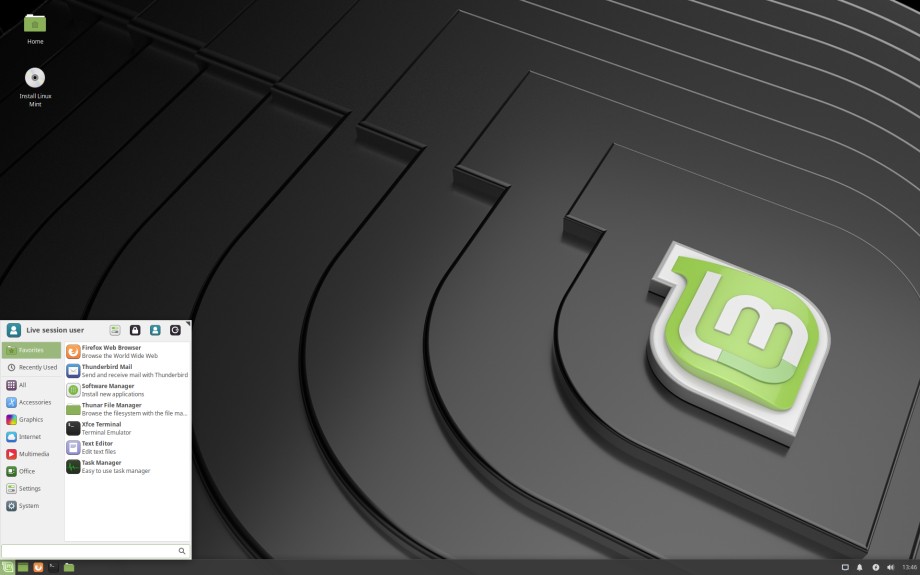
A preview of Linux Mint 19 Xfce Edition
The main highlights in Linux Mint 19 Cinnamon include:
  • Timeshift - A backup tool to backup your files and configurations. Although this tool was introduced in Linux Mint 18.3 and backported into other releases, it acts as a strategy center in Linux Mint 19 updates.
  • The Update Manager won't categorize updates based on their stability & reliability. Instead, the system will completely rely on timeshift to maintain the stability of the system.
  • Linux Mint 19 brings a brand new welcome screen for introducing operating system to the users.
  • Linux Mint 19 comes with a much-improved Software Manager, which also includes integrated support for flatpak applications.
  • Cinnamon Desktop 3.8, MATE 1.20, Xfce 4.12
For more details on Linux Mint 19 flavors, read separate release announcement of each Linux Mint flavor.
Linux Mint 19 Xfce release announcement
Linux Mint 19 MATE release announcement
Linux Mint 19 Cinnamon release announcement

MATE Desktop 1.20 released with improved stability and HiDPI support

Mr. Martin Wimpress, on behalf of MATE Desktop team, has announced the release of MATE Desktop 1.20, the latest stable release of modern desktop environment following traditional desktop metaphor. This release is a result of 9 months of continuous development since the announcement of MATE 1.18. It brings various bug fixes and enhancements over the previous release.
Global Menu in Ubuntu MATE 17.10 (File Picture)
The main focus in MATE 1.20 was stabilizing the ecosystem by replacing the deprecated code sections and rewriting some of the poorly written code snippets. It also includes an improved version of Macro - the window manager along with support for HiDPI.

The main highlights in MATE Desktop 1.20 can be summarized as follows:
  • HiDPI display support for dynamic resolution detection and scaling.
  • Improved cross-toolkit integrate with HiDPI hints for Qt applications
  • Dynamic resize and scale with HiDPI triggering, no log out/in required
  • Marco provides support for DRI3 and XPresent, if available.
  • Frame rates in games are significantly increased when using Marco.
  • Marco now supports drag to quadrant window tiling, cursor keys can be used to navigate the Alt + Tab switcher and keyboard shortcuts to move windows to another monitor were added.
  • Support for Global Menu providers like vala-panel-appmenu
  • Better status Notifier Items (SNI) support for MATE panels.
  • MATE Terminal now supports background images, adds Solarized themes and keybindings to switch tabs.
  • Atril, the document viewer, has had a massive overhaul and is better in every single way. Yes, all ways. Better!
  • In particular accessibility support for visually impaired users is considerably improved.
  • Caret navigation has been added.
  • The Invest applet has been dropped from MATE Applets.
  • The API, provided by Yahoo, has been discontinued and there is no reputable drop in replacement available.
  • Panel applets now size correctly based on the units being displayed and many graphs are dynamically scaled.
  • MATE Themes have seen significant improvements to fully implement all style classes exposed by GTK 3.22
  • Engrampa, the archive viewer, has improved support for encrypted 7z archives.
  • MATE Sensors Applet (finally) supports udisks2.
  • OpenBSD authentication is supported in MATE Screensaver and minizip in Atril supports more BSD variants.
  • Translations are updated. Thank you to our team of translators!
  • Also for distribution maintainers, the minimum GTK3+ and GLib requirements have been bumped.
  • GTK 3.22 and GLib 2.50 or newer are required to build MATE Desktop 1.20.
For more information and detailed change logs, see MATE 1.20 release announcement published in projects website.

Brisk Menu for MATE Desktop is getting better with favorites section and context menu

After a small delay, Mr Ikey Doherty, founder of Solus project has started working on Brisk Menu - a powerful and productive application menu for MATE desktop environment.

During past 3 days, there has been several commits on brisk menu repositories. These commits are related to new favorites section where users can pin/unpin their favorite applications and support for context menu. This development thread was started by cybre's pull request on brisk menu repository. Later, this process was taken forward by Ikey, and he has addressed various issues within past 3 days.

Demonstrating Pin to favorites option in improved brisk menu

Consolidating the recent improvements in brisk menu, Solus has shared one demo video in youtube.


Digging on github commit messages, following are main changes in brisk menu.
  • Cybre made push request with basic structure for Context Menu API, favorites backend and DesktopAppInfo actions.
  • Ikey improved favorites lookup with complexity of O(1).
  • Ikey made is_pinned behavior to expose as an API
  • Ikey removed all duplications from favorites section.
  • Fix some issues related with styling, segmentation fault and crash
  • Create context menu and make it capable to pin/unpin applications in favorites section.

GhostBSD 11.1 Alpha 1 released in MATE & Xfce flavors

Mr Eric Turgeon of GhostBSD project has announced availability of GhostBSD 11.1 Alpha 1 for testing. This is first development release prior to upcoming stable GhostBSD 11.1 release. It is available in both MATE and Xfce flavors for i386 and x86_64 architectures.

When sharing a development release with community, GhostBSD is expecting some volunteers to step in for testing the installation image. So that the final release can be made more reliable and robust by incorporating as many bugs as possible.

GhostBSD 10.1 MATE Desktop (Courtesy : Wikipedia)
GhostBSD 11.1 Alpha 1 release comes with some feature updates and fixes for various bugs. It can be summed up as follows:
  • A self hosted repository for GhostBSD
  • Updated packages
  • Whisker Menu as default Application menu of XFCE
  • Various fixes associated with:
  • XFCE and MATE live-session shutdown/suspend/hibernate
  • xf86-video-intel
  • MATE desktop fails on initial boot for install/li>
  • Clicking 'GhostBSD Bugs' item in the Main menu -> 'System Tools' brings up 'Server not found' page
  • XFCE installation - incorrect keyboard layout
  • ZFS setup appears to be incomplete
For more information, see original release announcement published in GhostBSD blog.

Ubuntu MATE 17.10 Alpha 2 released with reconfigurable panel layouts

Years ago, someone has told that Change is the only constant in life. Everything in this universe keeps on changing to cope with it's surrounding. Adhering to this universal law, Ubuntu MATE team had conducted a survey to see whether it is  right time to take a call for the change. Unfortunately it was difficult to draw a conclusion from these polls due to mixed response. Satisfying the urge for change, Ubuntu MATE team has announced availability of Ubuntu MATE 17.10 Alpha 2, second development release of upcoming Ubuntu MATE 17.10 stable release.

Mutiny (Unity like) layout in Ubuntu MATE 17.10
As the community had diverse opinions regarding the layout change, Ubuntu MATE 17.10 is shipping with default panel layout. Listening from the community, Ubuntu MATE team has incorporated easy layout switch option in MATE tweak tool. It provides following layouts
  • Mutiny mimics the Unity 7 interface
  • Cupertino provides something similar to macOS
  • Redmond will be familiar to Windows users
  • Pantheon a hybrid for long time desktop Linux users who want some modern conveniences
  • Contemporary a blend of the best of the old and the sprinkle of the new
  • Netbook people still use them and this layout is for them
  • Traditional just like your Dad remembers it, and still the default
In order to complete these layouts, Ubuntu MATE also provides provisions for
  • Global menu, a feature introduced by Unity Shell in Linux World
  • Complete super key support. There has been multiple patches in mate desktop components and plugins to make the super key to work as per expectations
  • Heads up display menu : You can search for applications and open them without leaving keyboard.
  • App indicator applet
  • MATE Tweak tools has been updated with the ability to switch between layouts.
For more details and layout previews, see original release announcement published by Ubuntu MATE team.

Manjaro 17.0.2 MATE & LXQt community editions released

Manjaro community developers has announced release of Manjaro 17.0.2 MATE & LXQt editions. The MATE edition of Manjaro provides a traditional looking, yet elegant and modern desktop experience. While Manjaro LXQt edition, features lightweight, yet fully functional LXQt desktop environment which is a good choice for netbooks and old computers.

Manjaro 17.0.2 MATE Desktop
Manjaro 17.0.2 MATE edition ships with MATE Desktop 1.18.x with full GTK3 support. It also includes updated version of Brisk Menu, a modern application menu developed by Solus project in collaboration with other mate communities. Another highlight in this release is adoption of slick greeter as default lightdm greeter. It will provide more compact, slick look for the lightdm greeter.

Netinstalelr on Manjaro LXQt 17.0.2
Manjaro 17.0.2 LXQt edition has a wider user base comparing to MATE edition (statement based on download/day from sourceforge website). This release makes use of Netinstall to provide users with the option to choose the required packages while installation.

For more information on these releases, see original release announcement and separate forum threads for MATE & LXQt editions.

Manjaro MATE 17.0 released with MATE Desktop 1.18

A few days after release of official flavors and other community flavors, Manjaro community is back with release announcement of Manjaro MATE 17.0, latest stable snapshot of Manjaro featuring MATE Desktop. Though the original installation images were made available a few days ago, release announcement was delayed a bit.

One of the major highlight of Manjaro MATE 17.0 Gellivara is MATE Desktop 1.18, latest stable release of traditional, well established desktop environment. MATE Desktop 1.18 marks completion of Gtk3 migration of project and all packages in this release is making use of Gtk3 framework which makes it competing with other modern desktop environments.

Courtesy : Manjaro Blog
Other highlights in Manjaro MATE 17.0 includes recent release of Brisk Menu - a modern application menu developed by Solus project in collaboration with Ubuntu MATE, customized Arch Maia theme - theme used by most of the Manjaro flavors, Slate Notifier theme which was initially developed for Budgie Desktop and latest version of Calamares installer.
Manjaro Mate comes with customized Arc Maia theme and uses the new Slate notifier theme, originally developed for the Budgie desktop. This edition now also offers a new feature of graphical installer Calamares that allows you to select some additional packages during installation. All the other well known Manjaro goodies are of course included to make your start and life easy with Manjarolinux.
For further information, see release announcement and forum discussions on Manjaro 17.0 MATE release.

Download Manjaro 17.0 MATE Edition
ISO 64 BIT | 32 BIT
TORRENT 64 BIT | 32 BIT

MATE Desktop 1.18 lands in Solus with other package updates

In weekly news letter of Solus project, the team has announced availability of MATE Desktop 1.18 in Solus stable repository. MATE Desktop 1.18 is most recent version of modern, productive desktop environment that follows traditional desktop metaphor. This release of MATE Desktop marks completion of Gtk3+ migration process which was started a while ago.

CREDIT : Solus Project
Other updates from Solus weekly news letter includes:
  • KDE Frameworks has been upgraded to version 5.32.0 and most recent version of KDenlive is made available in repositories.
  • Linux Kernel has been updated to 4.9.16 latest stable long term supported release.
  • Continued live stream which introduces Solus package management which begins from basic concepts and gradually moves into advanced concepts.
Currently, the team is working to improve ISO snapshots for Q1. This mainly includes following items.
  • A new release for brisk menu - a modern application menu for mate desktop, developed by Solus project in collaboration with Ubuntu MATE. This release will include option to open menu editor by right clicking on items and option to search for items in control center.
  • Budgie 10.3 - An upcoming bug fix release of budgie desktop. Possibly, this may the last release prior to upcoming Budgie 11.
  • Removing some outliers in UEFI installation process.
  • Reducing the verbosity of debug message during boot time.
For more information and a detailed list of updated packages, see This Week in Solus published in Solus blog.

MATE Desktop 1.18 released by completing GTK3+ migration

Mr Martin Wimpress, developer at MATE project has announced availability of MATE 1.18, latest stable release of traditional looking, modern desktop environment which was initially started as a fork of outdated GNOME 2.x project.

The main highlight of MATE 1.18 is completion of GTK3+ migration which was started a while back. This release includes desktop applications and other components built against GTK3+ by removing outdated and deprecated framework api calls.

Following are notable changes/highlights of MATE 1.18 release:
  • Entire applications and other desktop components are build against Gt3+
    • Requires GTK+ >= 3.14.
    • All GTK2+ code has been dropped including the --with-gtk build option.
  • Completed the migration to GtkApplication from libunique.
  • Added libinput to support mouse and touchpad.
    • Separate settings for handedness (left/right-handed) and motion acceleration/threshold.
  • Better accessibility support (Especially for visually impaired users)
  • Caja - The mate file managers comes with several improvements
    • Added a copy queue and copy pausing.
    • Asking confirmation before moving files to the Trash.
    • Support for back/forward mouse buttons for directory navigation.
    • Notification when ejected drives are safe to unplug.
  • Users can customize background of lock screen instead of using system default one.
  • MATE Panel gets several improvements, including:
    • Added desktop actions support for additional launch options.
    • Added StatusNotifier support.
    • Added support for Menulibre menu editor, if installed it is preferred over Mozo.
  • Engrampa, the archive manager, includes a number of improvements:
    • Added ear and war to the supported types list.
    • Check the rar/unrar version to the correct date is shown.
    • Fixed compress rar and 7z split into volumes.
  • Notifications now implement action icons support, for example playback control icons used by media players.
  • Reworked the font viewer to add font browsing mode, support for TTC fonts and expose it in the menus by default.
  • Replaced deprecated upower suspend/hibernate functions with ConsoleKit2 equivalents.
  • MATE Terminal adds the ability to close tabs with middle mouse button.
  • Atril, the document viewer, has much improved page load times and adds support for unarchiver used by some comics.
  • Lots of deprecated GTK+ methods have been replaced and many bugs have been fixed.
  • The plugin systems, and all C and Python plugins, in Eye of MATE and Pluma have been ported to libpeas.
  • Updated translations.
  • A number of memory leaks issues have been addressed.
  • MATE Calculator is back and has been ported to GTK3+
For more details, see release announcement in MATE project website.

Solus project announced first release of Brisk Menu

Mr Joshua Strobl, communication manager at Solus project has announced release of Brisk Menu 0.1.0, a modern, efficient and clean application menu for MATE Desktop. It enables quick launch of applications with search support, and includes other session control buttons for logout, shutdown with settings button.

Though Brisk Menu is developed by Solus project, other big plEnable ayers like Ubuntu MATE has also expressed their interest in this project and has collaborated together. Currently Ubuntu MATE is using mintmenu adopted from Linux Mint and they were looking for an alternative for a while.

A preview of Brisk Menu 0.1.0 in Solus MATE Edition
CREDIT : The Solus Project

Current release of Brisk Menu is at it's early stages of development and has a long way to go to fulfill the purpose of developers behind creating such a menu. Following are some of the todo features for Brisk Menu.
  • Enable launch of menu with Super/Meta/Windows/Command key.
  • Enable support for translation.
  • Favorite sections to pin applications
  • Ability to customize general behavior of menu, for example option to toggle sidebar icons.
  • Ability to customize label & icon.
The latest rolling snapshot of Solus MATE edition (2017.01.01.0) is featuring Brisk Menu. Or alternatively you can download the release snapshot from github releases.