Showing posts with label XFCE. Show all posts

Linux Mint 19 Cinnamon, Xfce & MATE editions released

The Linux Mint team has announced the immediate availability of Linux Mint 19 Tara. This release includes Cinnamon, MATE and Xfce editions of the project. All these releases are built on top of Ubuntu 18.04 but feature different desktop environments as the name suggests.

Linux Mint 19, is a release distribution based on Ubuntu 18.04 LTS, will be supported till 2023. In the meantime, users can enjoy serious package updates and security fixes for this release.
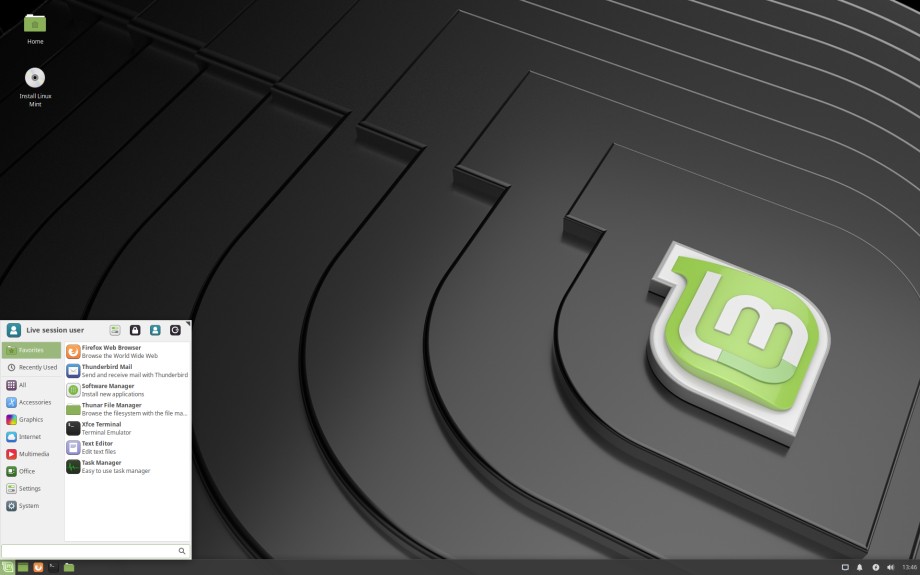
A preview of Linux Mint 19 Xfce Edition
The main highlights in Linux Mint 19 Cinnamon include:
  • Timeshift - A backup tool to backup your files and configurations. Although this tool was introduced in Linux Mint 18.3 and backported into other releases, it acts as a strategy center in Linux Mint 19 updates.
  • The Update Manager won't categorize updates based on their stability & reliability. Instead, the system will completely rely on timeshift to maintain the stability of the system.
  • Linux Mint 19 brings a brand new welcome screen for introducing operating system to the users.
  • Linux Mint 19 comes with a much-improved Software Manager, which also includes integrated support for flatpak applications.
  • Cinnamon Desktop 3.8, MATE 1.20, Xfce 4.12
For more details on Linux Mint 19 flavors, read separate release announcement of each Linux Mint flavor.
Linux Mint 19 Xfce release announcement
Linux Mint 19 MATE release announcement
Linux Mint 19 Cinnamon release announcement

GhostBSD 11.1 Alpha 1 released in MATE & Xfce flavors

Mr Eric Turgeon of GhostBSD project has announced availability of GhostBSD 11.1 Alpha 1 for testing. This is first development release prior to upcoming stable GhostBSD 11.1 release. It is available in both MATE and Xfce flavors for i386 and x86_64 architectures.

When sharing a development release with community, GhostBSD is expecting some volunteers to step in for testing the installation image. So that the final release can be made more reliable and robust by incorporating as many bugs as possible.

GhostBSD 10.1 MATE Desktop (Courtesy : Wikipedia)
GhostBSD 11.1 Alpha 1 release comes with some feature updates and fixes for various bugs. It can be summed up as follows:
  • A self hosted repository for GhostBSD
  • Updated packages
  • Whisker Menu as default Application menu of XFCE
  • Various fixes associated with:
  • XFCE and MATE live-session shutdown/suspend/hibernate
  • xf86-video-intel
  • MATE desktop fails on initial boot for install/li>
  • Clicking 'GhostBSD Bugs' item in the Main menu -> 'System Tools' brings up 'Server not found' page
  • XFCE installation - incorrect keyboard layout
  • ZFS setup appears to be incomplete
For more information, see original release announcement published in GhostBSD blog.

Zorin OS 12 Lite released with customized Xfce Desktop

Renouncing the commitment to deliver user friendly and less resource hungry operating systems, Zorin OS team has announced release of Zorin OS 12 Lite, latest stable release of lightweight operating system from Zorin family.

Zorin OS 12 Lite is using Xfce as base desktop environment. Earlier Zorin Lite releases were shipped with LXDE. Migrating from LXDE to Xfce will help Zorin project to provide a more customizable and complete desktop environment without compromising much with system resource usage.

A preview of Zorin OS 12 Lite(Courtesy : Zorin OS Blog)
Instead of providing a minimal desktop experience for low-end and outdated computers, Zorin OS Lite is trying to provide a valued desktop experience by providing an environment which almost resembles with Core edition of project.

Main highlights of Zorin OS 12 Lite release can be summarizes as:
  • To achieve our new goals for Zorin OS 12 Lite, we chose to move away from LXDE and adopt XFCE as the base desktop environment. This allows us to create an experience that is not only more familiar and consistent with Zorin OS 12, but is also more customizable and extensible than ever before. The result is a computing experience that’s more intuitive, beautiful and versatile, while keeping resource usage light.
  • In addition to the Lite and Lite Education editions before, we have released Ultimate, Business, and Education editions of Zorin OS 12 Lite. This will allow users with old and low-spec machines to have access to all the best Zorin OS apps and features out-of-the-box.
  • Zorin OS 12 Lite is the first version of Zorin OS Lite with Zorin Appearance pre-installed. Zorin Appearance brings together the functionality of Zorin Look Changer and Zorin Theme Changer into one app. With a click of a button, you can change the desktop layout to match that of Windows versions. The Ultimate and Business editions of Zorin OS 12 Lite also feature Gnome 2 and macOS-like layouts. Zorin Appearance is the go-to app for customizing your desktop, quickly and simply.
  • Many of the built-in system apps have seen extensive improvements both visually and under the hood.
For more information and snapshots, see release announcement published by Zorin team.

Download Zorin OS 12.1 Lite

Linux Mint 18.2 Sonya released in Cinnamon, MATE, KDE & Xfce flavors

The Linux Mint team has announced release of Linux Mint 18.2 Sonya. In addition to official MATE and Cinnamon flavors, KDE and Xfce flavors are also available for download. This is first time in history, Linux Mint team shipping all 4 flavors together.

Linux Mint 18.2 KDE Edition
Just like recent releases of Linux Mint, Linux Mint 18.2 is also based on Ubuntu 16.04.x LTS and will continue to provide support till 2021. This release is an incremental release in 18.x series and contains updated packages, user experience improvements and various bug fixes.

Some of the notable highlights in Linux Mint 18.2 Sonya can be listed as follows:
  • Cinnamon Desktop 3.4 which features better organization and management of desktop icons
  • Collection of Cinnamon applets, themes, desklets and other extensions which are commonly referred as Cinnamon spices.
  • Improved bluetooth support
  • A lot of refinements has been applied to Xed - text editor
  • The media player, Xplayer, also received improvements to its user interface.
  • It's now much easier to navigate in Pix. Keyboard and mouse shortcuts were reviewed and largely improved. They are more intuitive and more consistent with other applications such as Xviewer.
  • The Xreader PDF and document viewer received many bug fixes and improvements.
  • Just like Xreader and Pix, Xviewer's toolbar was also redesigned and it received support for dark themes.
  • The Update Manager received many improvements.
  • Linux Mint 18.2 features a brand new login screen. It uses the LightDM display manager by default along with the "Slick" greeter and the "LightDM Settings" configuration tool.
  • Brasero is still available in the repositories, but no longer installed by default.
For more information, see separate release announcement for Cinnamon, MATE, Xfce & KDE flavors.

Manjaro 17.0 Gellivara Plasma & Xfce flavors released

Mr Philip Muler, leader and developer at Manjaro project has announced release of Manjaro 17.0, latest stable snapshot of Arch based, rolling GNU/Linux distribution that comes with usability improvements such as user friendly installer, intelligent driver installation, pre-packed desktop environment & multimedia codecs ..etc. This release announcement is applicable for both Xfce and Plasma flavors of Manjaro which are supported by Manjaro team.

Manjaro 17.0 Gellivara KDE flavor ( Courtesy : Manjaro blog)
Manjaro 17.0 which referred by the code name Gellivara is a result of 3 months of development, testing and quality assurance effort by Manjaro team and other associated community members.

One of the key highlight of this release is improved Manjaro Settings Manager (aka. MSM), which comes with option to easily install & remove different versions of Linux Kernel to support a wide range of devices. When manjaro 17.0 is getting released, there are nine different kernel images available in repositories which ranges from extremely stable versions to most recent release which is 4.10. In addition to these, Manjaro also provides two real time kernels. Probably, Manjaro may be the only distribution that maintains this much number of kernels simultaneously.

Some of the common features of Xfce & Plasma flavors of Manjaro 17.0 can be summarized as:
  • We updated the stock kernel to linux49 4.9 LTS
  • We updated the Xorg-Stack to v1.19 series
  • We released Pamac v4.3.0 with native AUR-Support
  • We enhanced and improved our Manjaro Tools & Profiles
  • MHWD we adopted a more efficient way to handle libglx binaries
  • Some of our themes got updated and new got designed
For more information, see separate release announcement for Xfce & Plasma flavors of Manjaro.

Manjaro 17.0-rc1 Xfce & KDE flavors announced with Linux 4.9 LTS

After finishing release cycle for Manjaro 16.09 Gellivara successfully, it is time to finish another release cycle for Manjaro. Announcing the progress on this release cycle, Philip Muller, the manjaro project lead has announced Manjaro 17.0-rc1 first release candidate for upcoming manjaro release. As usual convention of project, this official release announcement is applicable for both Xfce and KDE flavors.

For those who are not familiar with Manjaro, it is an Arch based rolling GNU/Linux distribution that makes use of Arch principles such as rolling packages, simplicity and customizability and adds usability on top of it by integrating automated device detection & driver installation, graphical installer and pre-configured desktop environments.


The main highlights of both Xfce and KDE plasma flavors can be summarizes as:
  • We updated the stock kernel to linux49 4.9 LTS
  • We updated the Xorg-Stack to v1.19 series
  • We enhanced and improved our Manjaro Tools & Profiles
  • MHWD we adopted to handle a more efficient way to handle libglx binaries
  • Some of our themes got updated and new got designed
For more information, see separate release announcement for Xfce and KDE flavors.

Linux Mint 18.1 Serena Xfce & KDE editions released

The Linux Mint community has announced release of Linux Mint 18.1 Serena Xfce and KDE editions. These releases includes packages updates and usability improvements to provide a better user experience.

Linux Mint 18.1 a long term supported (LTS) release based on Ubuntu 16.04 LTS and it will continue to get critical security updates till 2021. Thereafter, the release will be discarded and users are expected to upgrade their system to a newer release.

Linux Mint 18.1 Xfce Desktop
The major highlights in both KDE & Xfce flavors can be summarized as follows:
  • KDE Plasma 5.8
  • Whisker application menu in Xfce flavor is upgraded to version 1.6.2
  • A new cross desktop compatible collection of common applications, X-Apps developed by Linux Mint project which includes text editor, media player, document viewer..etc. All these apps are inspired by old gnome school applications.
  • Improved update manager which include option to sort package updates based on origin and displays kernel versions in a more clear way.
  • Better language support which includes translated text for more packages.
  • World Wide availability of packages
  • Updated MDM - Mint Display Manager
  • Banshee music player is replaced with Rhythmbox
  • Improved artwork
  • Linux Kernel 4.4
For more details, see separate release announcements for Xfce & KDE flavors of Linux Mint 18.1.

AryaLinux Xfce 2016.08 released with bug fixes and ehancements

The AryaLinux team has announced release of AryaLinux Xfce 2016.08, latest stable release of independently developed, general purpose GNU/Linux distribution built from scratches, offering Xfce desktop environment.

AryaLinux Xfce 2016.08 is basically a bug fix release with a few enhancements. Though the main motive of this release was to provide a more stable system with less bugs, it also ships a refreshing desktop look and feel. The desktop layout is restructured, light themes are used and some heavy applications have been replaced with lightweight counterparts to make things more appealing for the users.


Some notable features/changes in AryaLinux 2016.08 can be summarized as follows:
  • Linux kernel version 4.7.2 – this update brings in support for some newer hardware
  • XFCE 4.12 – The latest version of XFCE.
  • Libreoffice 5.1.4.2
  • gcc 6.1.0
  • qt-5.7.0
  • VLC and audacious have been dropped in favour of Parole and Exaile as the video and audio player simply to keep the entire default application stack on GTK2/3
  • Support for Chinese language has been provided through the ibus and ibus-rime packages
  • Language Selector included in the base installation.
  • Firefox 47.0.1
  • AryaLinux Installer can now install into USB and Removable Hard Disks.
  • A notable change in the base-system build scripts is the addition of italian translations.
 You can find details of this release on a release announcement published in projects website.

Download AryaLinux Xfce 2016.08
32 BIT - ISO | TORRENT
64 BIT - ISO | TORRENT

Comparing memory usage of LXQt Desktop with LXDE, Xfce and others

It is often told that, Qt is a bloated framework and anything that make use of it will be bloated and will require considerable amount of memory. But a study conducted by LXDE/LXQt team shows this is not a valid statement and comparing to the benefits offered by Qt it does not consume much memory.

What is LXQt Desktop

LXQt is a lightweight and user friendly desktop environment built using Qt frameworks. The motive behind LXQt project is to provide a familiar user experience without consuming too much of the system resources. It is a new branch of LXDE, another lightweight desktop environment.

Memory comparison

A survey conducted by LXQt team claims that, the memory usage of LXQt desktop is less than all other desktop environments which provides similar or better user experience. It is almost comparable with memory usage of LXDE, with a lot of added features.

source : LXDE blog

You can find more details on this survey in  a blog post published in LXDE blog.

Salix Xfce 14.2 released

Finally, the Salix project has announced release of Salix Xfce 14.2, latest stable release of Slackware based, simple, fast and easy to use operating system featuring Xfce desktop. This stable release comes a long time after previous stable release and comes with a lot of changes.

The Salix OS 14.2 can be installed in several languages including Dutch, Greek, Italian, German, Spanish ..etc. The 64 bit Salix OS now uses lilo boot menu instead of grub. Also this release comes with all updated packages including Xfce 14.2, Linux Kernel 4.4.19, glibc 2.2.9 and many more packages.

Salix 14.2 also introduces two in-house developed GUI tools. These tools are GUEFI, a graphical boot manager for UEFI systems and other one is gtkreposetup, a graphical front end for reposetup tools. These tools are expected to improve user experience.

With respect to other software included in this release, Xfce has been upgraded to 4.12. The main browser has been changed back to Firefox. The Firefox package now also includes langpacks for the most popular languages too, so it will most probably also be presented in your native language without having to install anything extra. Also, network configuration is now handled by NetworkManager, instead of Wicd, which would also help people connect using their mobile 3G/4G connections. Pulseaudio is now controlling the audio output by default, which should help a lot with bluetooth speakers, HDMI audio etc. Other than that it's mostly the same as in previous releases, with LibreOffice, Claws-Mail, Gimp, Parole, Transmission, Viewnior, Zim etc. Everything has been upgraded to their latest release at this point. Of course, the usual collection of Salix System Tools is included, so you can still use Gslapt and Sourcery for managing packages and SlackBuilds and also the usual tools for managing Users, System Services, the System Language and Keyboard settings etc.
For more information and discussions on this release, see release announcement published in Salix forums.

Download Salix 14.2 Xfce